
The Readiris PDF 27 offers three methods for connecting to your scanner. The Readiris software does not install scanner drivers. Those are provided by the software installation from the scanner manufacturer or built into Windows.
TWAIN
This is the traditional connection method which requires the full software installation from the scanner manufacturer. For HP users the Smart app install is not enough.
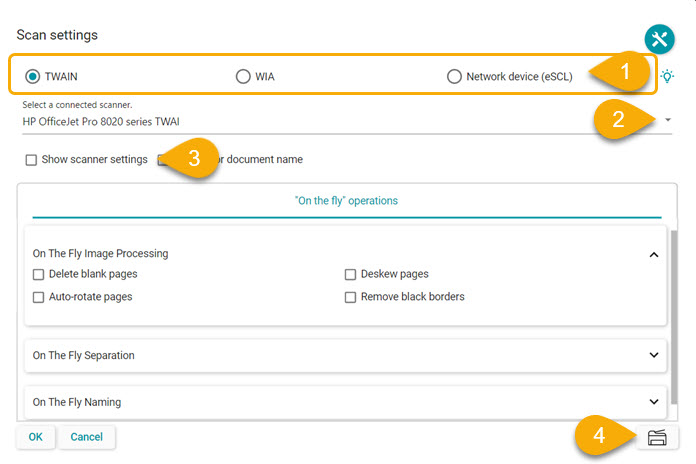
- Select the TWAIN option and choose the scanner in the drop down.
- The scan setting can be preset by clicking on the green settings button and then clicking the scan button.
- The settings can be set at the time of scanning by checking the "Show scanner settings" box.
- Click the Scan button on the lower right or in the main window.
WIA
Windows basic scan interface either available when the scanner is first connected or downloaded from the manufactures web site.
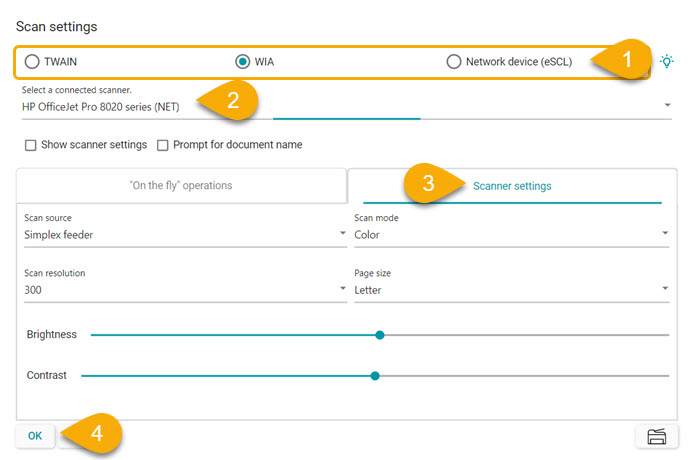
- Select the WIA option and select your scanner in the drop down.
- Click on the Scanner settings tab and select your scan options and click OK.
- Click the Scan button on the lower right or in the main window.
Network device (eSCL)
An emerging standard intended for network connected scanners and designed by the scanner manufacturer to make use of it. If available for your scanner no driver installation is needed.
The setup is the same as with the WIA.




Casey King
Comments