Start a conversation

VSL connection problem for Mac

If the Virtual Scanner Link (VSL) does not automatically connect then set the IP address manually using these steps. 

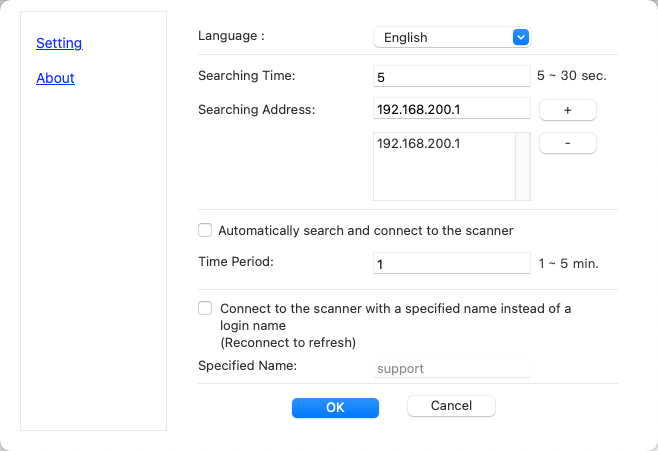
  • Start the VSL software and click on Options.
  • Enter the IP address, 192.168.200.1, and click on the plus button to add it. 
  • Click on OK.
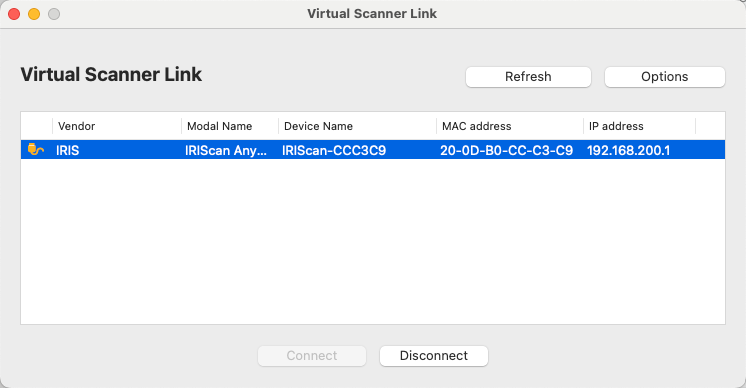
  •  Click the Refresh button and the scanner should appear as an option.

  • Highlight and click Connect.

  • Connection is now ready to use.

Choose files or drag and drop files
Was this article helpful?
Yes
No
  1. Casey King

  2. Posted
  3. Updated

Comments

Contact us

If one of the above article didn't help you , if you are looking to contact us for business enquiries or if you want to return a product, do no hesitate to contact us! One of our agent will take care of your request as soon as possible.

Return Requests

Select the reason for your request:

Cancel an order (< 30 days) Defective (Warranty)