
The software installer is found on this page. It is a small download that will automatically detect the plugged in and powered on scanner and then download and install the necessary software.
http://www.irislink.com/support/iriscanpro
There are separate downloads for Window and Mac. You will also find user guides and other useful information on this page.
Windows software
- Readiris PDF 23 OCR software and PDF editor
- Button Manager software
- Scanner driver and Capture tool.
Macintosh software
- Readiris PDF 23 OCR software and PDF editor
- Scanner driver and Capture tool.
Activation of the Readiris PDF 23 software.
- Plug your scanner into the computer and power it on.
- After the installation start the Readiris PDF 23 software and it will ask to be activated.
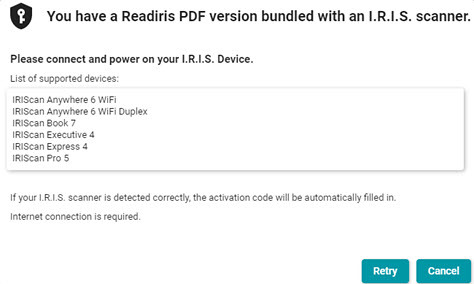
- Click on "I want to activate with my I.R.I.S. scanner."
- This message will appear and in a moment the software will detect the scanner and auto activate.
How to use Readiris PDF 23
- In Readiris click the down arrow to the right of "From Scanner" and select the IRIScan Pro 5
- Note the Append | Slide control.
- Append means that each scan will accumulate before you process to a single output document. This is useful for creating multipage PDF files.
- New means that each scan will open in a new tab and be processed separately.
- Click the scan button to bring in the page(s).
- Click the format you want to process to in the Quick Convert section on the Home tab to process to an output file. The default save location is Documents ⯈ Readiris PDF
- For Advanced options go to the Convert tab and click the format and then set options in the right panel that appears.

Capture tool
the Capture Tool found in the Start menu on Windows or the Applications folder on Mac.

It is a simple tool to scan to these formats as images with no OCR.
JPEG
BMP
JPEG
GIF
PDF
MPDF - Multiple page PDF
TIFF
MTIFF - Multiple page TIFF
Windows only - How to scan with Button Manager?
The Button Manager is versatile software to scan to a variety of formats and destinations at the touch of a button or a click of the mouse. It is an updated version that will always display this icon unlike earlier versions.

It is best understood by watching this short how-to video.




Casey King
Comments