
How to Resolve Error 1722 During Readiris 17 Installation
If you are trying to install Readiris 17 on Windows 10 or Windows 11 and receive an Error 1722, this guide will help you resolve the issue.
The Issue:
During installation, a 1722 error appears and blocks the setup process.
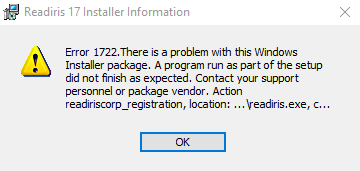
Cause of the Error: 💡
Readiris 17 requires a standard Microsoft component called .NET Framework 3.5 to run correctly. Depending on your version of Windows, this feature may need to be enabled manually or downloaded from Microsoft.
Option 1: For Windows 10 & Windows 11 (Versions 25H2 and older) ⚙️
On these versions, the necessary component is built into Windows but may be turned off by default. To enable it:
- 🖱️ Right-click on the Windows Start button and select Run from the menu.
- ⌨️ In the Run window, type or paste the following text:
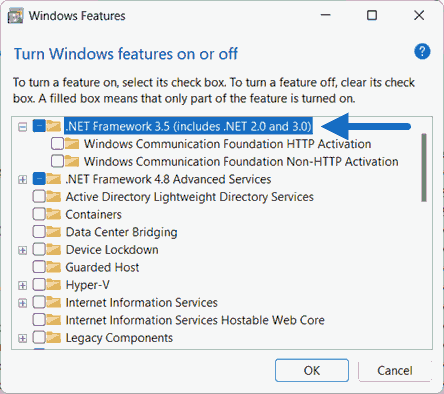
optionalfeaturesand click OK. - ✅ The "Windows Features" window will open. Locate ".NET Framework 3.5 (includes .NET 2.0 and 3.0)" at the top of the list and check the box next to it.
- ⬇️ Click OK. Windows will automatically download and install the required files.
- 🚀 Once the changes are complete, restart your Readiris 17 installation.
Option 2: For Windows 11 (Version 26H1 and newer) 🆕
Starting with Windows 11 version 26H1, .NET Framework 3.5 is no longer available through the "Windows Features" menu. It must be downloaded directly from Microsoft:
- 🌐 Visit the official Microsoft download page to get the .NET Framework 3.5 Standalone Installer.
- ⬇️ Download and run the installer file.
- 🚀 Once the installation is finished, restart your Readiris 17 setup.
🔍 Tip: If you are unsure which Windows version you have, press the Windows Key + R, type winver, and press Enter to check.
If you require further assistance, please reach out to the IRIS Support Team.




Casey King
Comments