
Visit this page to download the software. You will also find user guides
http://www.irislink.com/support/iriscanbook7
For PC it includes this software.
- Readiris PDF 23 - Advanced OCR software
- InstantResult - Simplified software for importing images from the scanner to convert to common output formats.
For Mac only the Readiris PDF 23 is available.
The InstantResult is Windows only. For usage information for the InstantResult on Windows see this article.
https://support.irislink.com/article/1204.
Activation of the Readiris PDF 23 software.
- Plug your scanner into the computer.
- After the installation start the Readiris PDF 23 software and it will ask to be activated.
- Click on "I want to activate with my I.R.I.S. scanner."
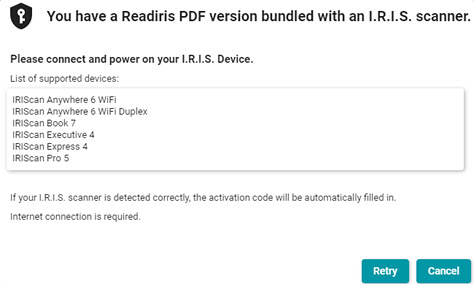
- This message will appear and in a moment the software will detect the scanner and auto activate.
How to use the IRIScan Book 7
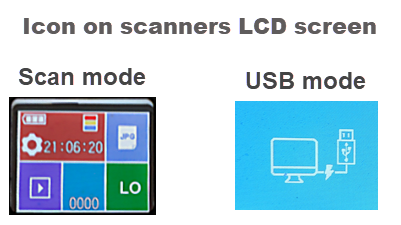
Everything that is scanned with the IRIScan Book 7 is saved to the micro SD card plugged into the side of the scanner. It is not possible to start a scan with any software. Instead when the scanner is plugged into a computer it automatically switches to USB mode and the scans can be opened in the software.
Open the Readiris PDF software and click on the From File button
On Windows navigate to this folder to access the files you want to work with.
USB Drive:\DCIM\100MEDIA
On Mac navigate to this folder.
SD_VOL/DCIM/100MEDIA
- Click on the “From file” button in Readiris PDF 23 to bring in the scan.
- Note the Append | Slide control.
- Append means that each scan will accumulate before you process to a single output document. This is useful for creating multipage PDF files.
- New means that each scan will open in a new tab and be processed separately.
- Click the format you want to process to in the Quick Convert section on the Home tab to process to an output file. The default save location is Documents ⯈ Readiris PDF on Windows.
- On Mac you will be asked to set the default save location.
- For Advanced options go to the Convert tab and click the format and then set options in the right panel that appears.

Windows users see this article for using the InstantResult software.
https://irislinksupport.kayako.com/article/1204




Casey King
Comments