
Start a conversation

Change available output formats for Readiris 16 Mac

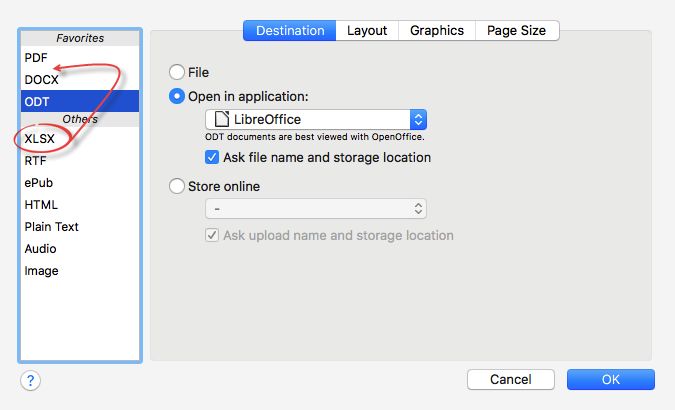
To select a different output format than the 3 default ones:

  1. Click Export Options on the top toolbar.
  2. Drag the required output format from the Others list in the left column of the interface to the Favorites list.
  3. Choose its Destination:  File | Open in application | Store online.
  4. Click the Layout tab to configure the formatting options.
  5. Click OK and the new format will appear on the top toolbar.
Choose files or drag and drop files
Was this article helpful?
Yes
No
  1. Casey King

  2. Posted
  3. Updated

Comments

Contact us

If one of the above article didn't help you , if you are looking to contact us for business enquiries or if you want to return a product, do no hesitate to contact us! One of our agent will take care of your request as soon as possible.

Return Requests

Select the reason for your request:

Cancel an order (< 30 days) Defective (Warranty)


